
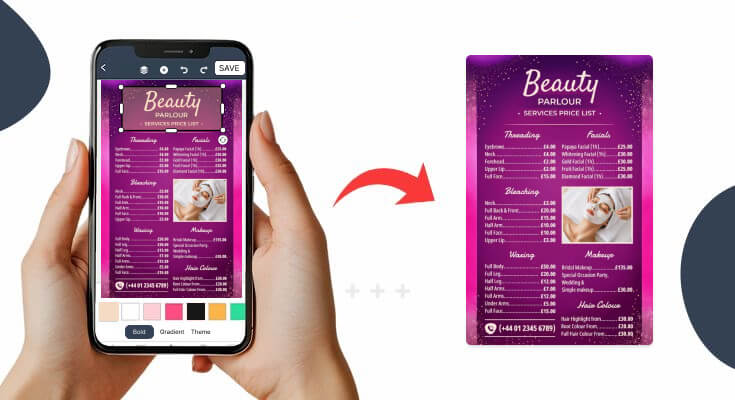
Creating an effective price list menu can transform your business success. Whether you run a restaurant, café, or service-based business, a well-designed menu price list serves as your silent salesperson. Moreover, it helps customers make quick decisions while professionally showcasing your offerings.
In this comprehensive guide, you’ll discover proven strategies to create compelling menu pricing that drives sales. Additionally, we’ll explore design principles, psychological tricks, and practical tips that successful businesses use on a daily basis.
What Makes a Price List Menu Truly Effective?
There are many key elements that you need to understand for price list menu creation. Also, it separates winning menus from mediocre ones.
Additionally, these principles apply whether you’re designing digital menus or printed versions.
Essential Components of Successful Menu Pricing
Every high-converting price list menu includes these critical elements:
- Clear Item Descriptions: Customers need to understand exactly what they’re buying. Consequently, avoid jargon and use descriptive language that creates an appetite appeal.
- Strategic Price Positioning: Place your most profitable items where eyes naturally look first. Similarly, use visual hierarchy to guide customer attention.
- Visual Appeal: Clean design, readable fonts, and appealing images work together to enhance the dining experience. Moreover, consistency in formatting builds trust and professionalism.
- Logical Organization: Group similar items together and create a smooth flow from appetizers to desserts. Furthermore, this organization helps customers navigate your offerings effortlessly.
Check out these great examples of a price list menu that contains all these key components, and you may find them as an inspiration.
What Should You Consider Before Creating a Price List Menu?
Creating a price list menu is a crucial step for any business, whether you’re running a café, salon, boutique, or offering services like freelancing. It’s the first point of contact between you and your customers, so it’s important to get it right.
Before you start designing or listing your prices, there are several key factors to consider. These considerations will help you craft a price list that is clear, attractive, and effective.
1. The Power of Strategic Positioning
Customers typically scan menus in predictable patterns. Therefore, place your most profitable items in high-visibility areas.
The Golden Triangle: Position key items in the upper right corner, center, and upper left of your menu. Consequently, these areas receive the most attention.
2. Decoy Pricing Strategy
Introduce a high-priced “decoy” item to make your target items seem more reasonable. For example, if you want to sell more $16 entrées, add a $24 option nearby.
This technique works because customers often choose the middle option when presented with three choices. Furthermore, it increases perceived value across your entire menu.
3. Remove Dollar Signs
Studies suggest that removing dollar signs from prices can increase spending. Instead of writing “$12.99,” simply write “12.99” or “twelve ninety-nine.”
This subtle change reduces the psychological pain of spending money. Moreover, it creates a more upscale dining atmosphere.
4. Offering Bundles and Packages
Humans love a good deal, and creating bundles or combo offers is a great way to tap into this behavior. When you offer several items or services together at a slightly discounted price, customers feel like they’re getting more for their money.
For example, if a customer is ordering a coffee, consider offering a combo deal: Coffee & Muffin Combo – $5.50 (instead of $6 individually).
Bundle Strategies: The idea of getting more for less taps into perceived value. Customers may choose the bundle even if they only wanted one item, thereby increasing your sales.
5. The Psychology of “Free” or “Discounted” Items
Lastly, customers love the word “free.” By offering free add-ons, like a free drink with a meal or a free consultation with a service, you trigger a psychological feeling of getting something extra without spending more.
- Freebies: A free side dish, drink, or upgrade can make customers feel like they’re receiving more value, leading them to spend more overall.
- Discounted Packages: Offering “Buy One, Get One Free” or “20% off your second item” encourages larger purchases by making customers feel like they’re getting more for their money.
What is the Process of Creating a Price List Menu?
Creating a price list menu—whether for a restaurant, salon, freelance services, or any other business—helps your customers understand what you offer and how much each item or service costs. A clear and professional menu also builds trust and helps increase sales.
Here’s a step-by-step process to create a price list menu:
Step 1: Understand Your Business and Audience
Before you start designing, think about what kind of business you have and who your customers are.
- Are you offering food, beauty services, digital services, or physical products?
- Is your audience young and modern, or more traditional?
- Are they looking for luxury, budget, or something in between?
Why this matters: Knowing your audience helps you choose the right tone, layout, and design for your menu.
Step 2: List All Your Products or Services
Before you can create a price list menu, you need to clearly identify everything you offer. This step is about writing down all the products or services your business provides. Think of it as creating a full inventory of what you sell. It’s important to be organized and thorough, so you don’t miss anything that should be included on your menu.
Example for a hair salon:
- Haircuts
- Men’s haircut
- Women’s haircut
- Children’s haircut
- Styling
- Blow dry
- Hair straightening
- Treatments
- Hair spa
- Deep conditioning
Tips:
- Don’t leave out any important service or product.
- Use simple names for each item.
Step 3: List All Your Menu Items
Before you can create a price list menu, you need to clearly identify everything you offer. This step is about writing down all the products or services your business provides. Think of it as creating a full inventory of what you sell. It’s important to be organized and thorough, so you don’t miss anything that should be included on your menu.
✔️ Tips for Listing Your Menu Items:
- Write down all your offerings, even the small ones. Include main items, add-ons, and extras.
- Group similar items under categories (e.g., Haircuts, Treatments, Coffees, Desserts).
- Use clear, simple names for each item or service—avoid confusing terms.
- Think from the customer’s point of view—what would they expect to see listed?
Step 4: Write a Compelling Item Description
Once you’ve listed your menu items, the next step is to add short, clear, and engaging descriptions for each one. Writing a food menu description helps your customer understand what the item is, what makes it special, and why they should choose it. This is especially important if your menu includes unique products, specialized services, or higher-priced options.
The description doesn’t need to be long—just a sentence or two can make a big difference. The goal is to highlight key ingredients, benefits, features, or the experience your product/service provides.
Tips for Writing Great Descriptions:
- Keep it short and specific. One or two lines are enough.
- Focus on benefits or flavors. What will the customer enjoy or experience?
- Use sensory or appealing words (e.g., rich, creamy, handcrafted, soothing).
- Avoid technical jargon unless your audience expects it.
- Highlight what makes the item special. (e.g., organic, made-to-order, locally sourced)
Step 5: Decide on Pricing
Apply psychological pricing principles to maximize revenue. For instance, prices ending in 9 often perform better than round numbers.
Once your items or services are listed, assign a price to each one.
Additionally, consider these pricing strategies:
- Anchor pricing: Place expensive items first to make others seem reasonable
- Bundle pricing: Offer combo deals that increase average order value
- Odd pricing: Use prices like $12.95 instead of $13.00
How to decide your prices:
- Look at what your competitors charge.
- Calculate your costs (materials, time, rent, etc.).
- Choose whether you want to be budget-friendly, mid-range, or premium.
Tip: If you offer packages, for instance, a combo meal or haircut + spa deal, include those too. They can attract more customers.
Step 6: Design and Layout
There are many types of menu formats that you can choose for your business. Your menu format depends on your business type and customer needs. However, consider these popular options:
- Single-page flyer for simple offerings
- Printed menu (for restaurants, salons.
- Digital menu (PDF, online link, Instagram post)
- Tri-fold brochure for moderate selections
- Multi-page booklet for extensive menus
- Digital displays for quick-service restaurants
Keep in mind that if you change prices often, creating digital menus is easier to update. On the other hand, printed menus should be high-quality and well-designed.
Step 7: Create Visual Hierarchy
Creating a visual hierarchy means organizing the content on your price list in a way that guides the reader’s eyes naturally and makes the information easy to scan. People don’t read menus line by line—they quickly scan for keywords, categories, and prices.
A strong visual hierarchy helps your customers quickly find what they’re looking for, understand your offerings, and focus on the most important items.
Tips for Creating Visual Hierarchy:
- Use larger or bold fonts for section titles (e.g., “Haircuts” or “Hot Beverages”).
- Make item names slightly bolder than descriptions to help them stand out.
- Keep prices aligned (right or left) and spaced out for quick comparison.
- Use consistent font styles and sizes to avoid a messy or confusing layout.
- Add extra space between sections to separate categories clearly.
- Don’t forget to use the right menu size, as it is very important for a better user experience.
Step 8: Keep It Up to Date
Keeping your price list menu up to date is just as important as creating it. As your business grows, your services, products, and pricing will naturally change. Maybe you’ve added a new item, discontinued an old one, increased your prices due to rising costs, or are offering seasonal specials.
If your menu still shows outdated information, it can confuse or frustrate customers, and possibly lead to lost trust or missed sales.
Tips for Keeping Your Menu Updated:
- Review your menu every 3 to 6 months or when major changes happen.
- Adjust prices based on cost changes, demand, or competitors’ pricing.
- Add or remove items as your business evolves (introduce seasonal specials or remove slow sellers).
- Highlight “new” or “limited-time” items to keep the menu fresh and engaging.
- Ensure consistency—if you update prices on one platform (your website), make sure it matches your printed or social media menus.
Pro tip: If you find it difficult to create a menu that follows all these steps, simply use an online menu creator that removes all blocks and helps you design a menu for your cafe quickly.
What Design Principles Create Professional-Looking Price List Menus?
Great menu design combines aesthetics with functionality. Additionally, a professional appearance builds customer confidence and justifies higher prices.
Typography Best Practices:
Choose fonts that reflect your brand personality while maintaining readability. However, avoid using more than two different fonts to prevent visual chaos.
Recommended Font Combinations:
- Modern restaurants: Helvetica for headers, Open Sans for body text
- Traditional establishments: Times New Roman for headers, Georgia for descriptions
- Casual dining: Roboto for headers, Lato for menu items
Color Psychology in Menu Design:
Colors influence customer emotions and purchasing decisions. Therefore, choose your color palette strategically.
- Red: Stimulates appetite and creates urgency
- Green: Suggests freshness and healthy options.
- Blue: Calms customers but may suppress appetite.
- Orange: Encourages impulse purchases and creates energy.
- Brown: Conveys warmth and comfort food appeal
Here find more about great colors and font selection for menu designs.
White Space and Layout Balance:
Cramped menus overwhelm customers and hurt sales. Instead, use generous white space to create breathing room and highlight important information.
Follow the 60-30-10 rule:
- 60% white space
- 30% text and descriptions
- 10% images and graphics
Creating a menu that follows all these steps and makes customers drool over the menu is difficult, but choosing the customizable menu designs option makes the process faster and easier.
How to Test and Optimize Your Price List Menu?
Creating your menu is just the beginning. Furthermore, continuous testing and optimization ensure maximum profitability over time.
1. A/B Testing Different Versions
Create two menu versions and test them with real customers. Subsequently, measure results like average order value, customer satisfaction, and ordering speed.
Test these elements:
- Price points for popular items
- Item descriptions and language
- Layout and visual hierarchy
- Special offers and promotions
You can find some amazing menu layout examples to test different variations and create a perfect menu that delights customers.
2. Gather Customer Feedback
Ask customers directly about their menu experience. Additionally, observe their behavior while ordering to identify confusion points.
Use these feedback methods:
- Brief surveys with receipts
- Social media polls and questions
- Staff observations during busy periods
- Online review analysis
3. Monitor Sales Data
Track which items sell best and generate the most profit. Moreover, identify slow-moving items that might need repricing or removal.
Key metrics to monitor:
- Item-level sales volume
- Profit margins by category
- Average order value trends
- Customer return frequency
How Often Should You Update Your Price List Menu?
Menu updates require careful timing and strategy. Additionally, frequent changes can confuse customers, while outdated menus hurt profitability.
Seasonal Updates:
Update menus seasonally to reflect ingredient availability and customer preferences. Moreover, seasonal items create excitement and encourage repeat visits.
Consider these seasonal strategies:
- Summer: Fresh salads and cold beverages
- Fall: Comfort foods and warm drinks
- Winter: Hearty soups and hot entrées
- Spring: Light dishes and fresh ingredients
Price Adjustments:
Monitor food costs and adjust prices when necessary. However, avoid frequent small increases that irritate customers.
Instead, make meaningful adjustments 2-3 times per year. Additionally, communicate changes positively by emphasizing quality improvements.
Performance-Based Changes:
Remove consistently poor-performing items and replace them with new options. Furthermore, promote successful items to better menu positions.
Track performance for at least 90 days before making decisions. Moreover, consider external factors like weather, events, and competition.
Frequently Asked Questions
1. What is the first step in creating a price list menu?
The first step in creating a price list menu is to understand your business and target audience. Identify the products or services you offer, then consider who will be using your menu. Are your customers price-conscious, or are they looking for premium experiences? This step will guide your design, language, and pricing strategy. Once you know this, you can move on to listing your menu items clearly and categorizing them logically (e.g., drinks, meals, services).
2. Should I include taxes in my price list menu?
It’s generally a good practice to display prices without tax, especially for items where taxes can vary by location (like for services or goods). This allows your customers to know the base price of each item. However, if you want to make it simpler for your customers, you could include tax-inclusive prices if you’re in an area with a fixed sales tax rate.
For service industries, such as salons or consulting, it’s common to list prices without tax and mention at the bottom of the menu that taxes will be added at checkout.
3. What’s the best way to format my price list for clarity?
A clear, well-organized price list helps customers easily navigate your offerings. Follow these key formatting tips:
- Use headings and categories to group similar items (e.g., drinks, entrees, desserts).
- Align prices uniformly—all prices should be in the same column, either left-aligned or right-aligned.
- Make item names stand out by using slightly larger or bold fonts.
- Use bullet points or tables to make your menu visually appealing and easy to scan.
- Include white space to avoid clutter and make the menu easy to read.
A visually clear menu enhances the customer experience and reduces confusion.
4. How can I highlight high-margin items on my price list?
To highlight high-margin items, consider these tactics:
- Position them at the top or center of your menu, where customers’ eyes naturally fall first.
- Use descriptive, tempting language to make these items stand out (“Chef’s Special” or “Signature Dish”).
- Add visual cues, like stars, boxes, or icons, to draw attention to these items.
- Bundle them with other products to increase their perceived value (pairing a high-margin entrée with a side or drink at a discounted price).
These strategies can make your high-margin items more appealing to customers.
5. How do price list templates help in menu creation?
Price list templates can save time and effort by providing pre-designed layouts and structures, which you can easily customize to fit your business needs. These templates:
- Offer structure: They provide a framework that helps you organize your menu cleanly and professionally.
- Save design time: If you’re not familiar with design, templates make the process easier by offering predefined fonts, layouts, and color schemes.
- Consistency: Using templates ensures a consistent look across your business materials (e.g., website, printed menus, social media).
You can find various templates online, some free and some paid, which can be edited to match your brand.
6. Are there free price list menu templates available?
Yes, many websites offer free price list menu templates, including:
- Lisi.menu: provides thousands of menu templates that you can easily customize and share.
- Google Docs and Microsoft Word also offer free basic templates.
- There are many other resources out there that you can find to get the desired templates.
Free templates are perfect for businesses on a budget, but they might come with fewer features compared to premium options. However, they can still be easily customized for your business needs.
Conclusion
Now you’ve understood the process of how to make a price list menu, and what things you should keep in mind before you start to create.
Ultimately, a well-thought-out price list menu is a powerful tool that can influence purchasing behavior, increase revenue, and build customer loyalty. By investing time and effort into designing a compelling price list, you’ll make it easier for customers to make informed choices and feel confident about the value they’re receiving from your business.