
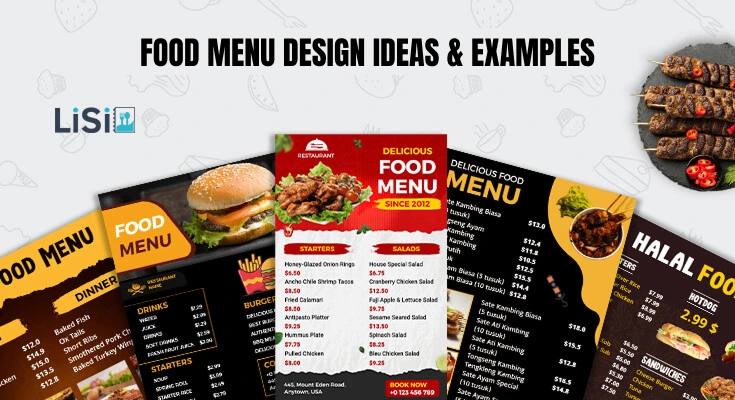
Have you just started your new restaurant, cafe, or food truck, and are looking for exclusive food menu design ideas? You’re on the right page.
Studies show that customers spend only 109 seconds reading a menu before making their decision. Therefore, every design element must work strategically to guide their choices and maximize your profits.
This guide will walk you through results-driven food menu design examples with actionable ideas—from layout strategies and typography choices to color psychology and use of images.
So, read on to learn more.
What are the Best Food Menu Design Examples and Ideas?
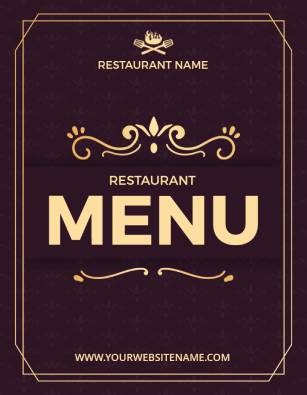
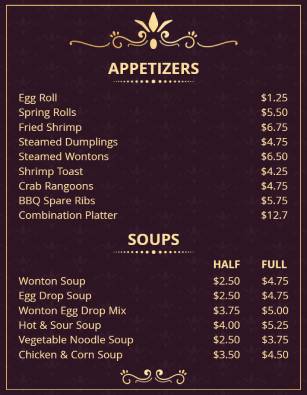
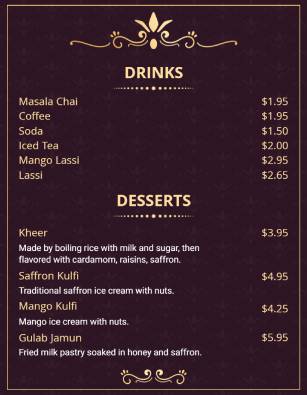
Discover a charming variety of thoughtfully crafted food menu design examples and customizable menu designs to elevate your restaurant’s ambience and instill pride in discerning diners.
(Tao to Edit)
(Tao to Edit)
(Tao to Edit)


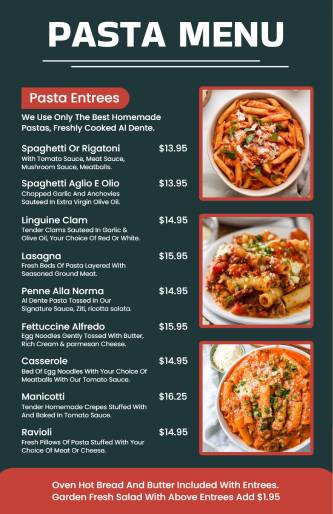

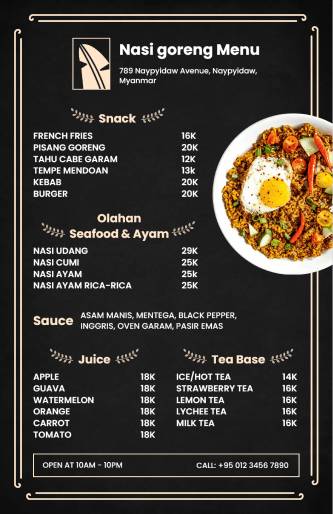


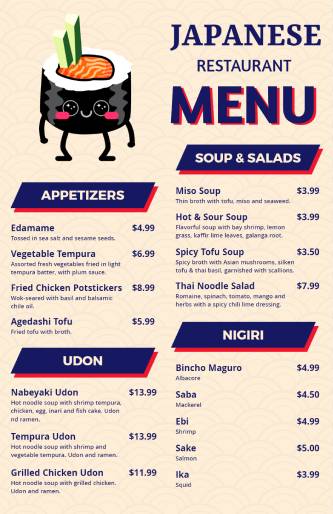


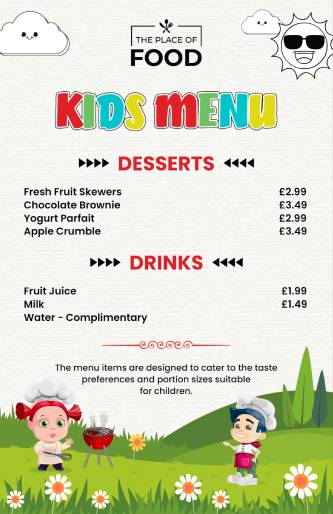
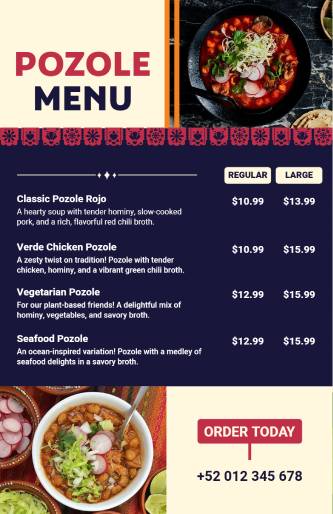

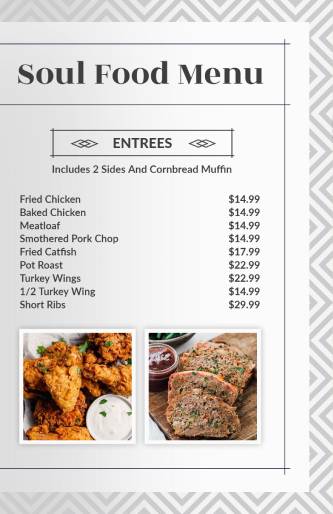


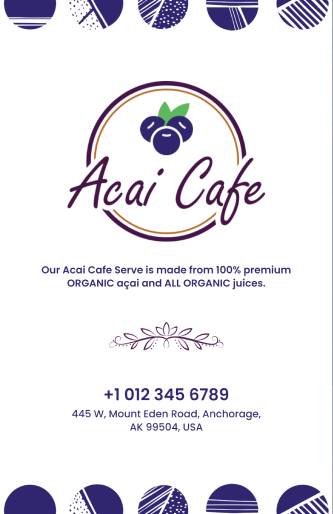


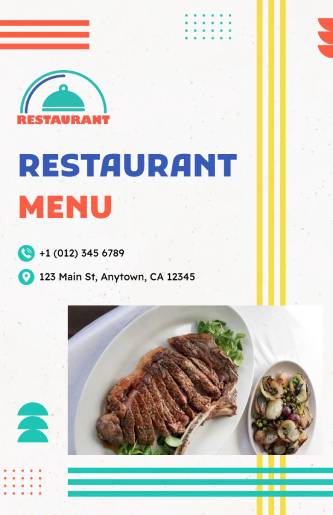
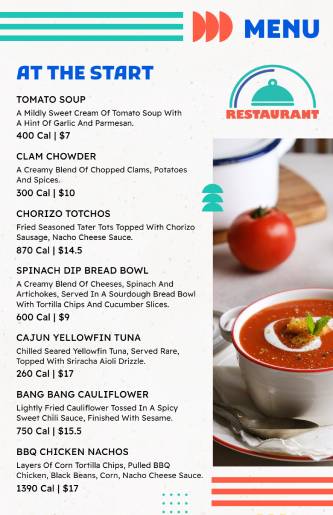

If you’re still struggling to create a menu for your restaurant, cafe, bistro, and more, there’s a solution for you. Go to a food menu builder that will help you find, customize, and download any pre-designed template, and create a menu quickly.
What Makes a Food Menu Design Visually Appealing and Profitable?
A well-designed menu not only looks good but also helps people order more and choose your most profitable dishes.
So, what makes a food menu both visually appealing and profitable? Let’s explore the key elements in detail.
1. Clear and Simple Layout
A clear and simple menu layout is one of the most important parts of good menu design. When your menu is easy to read and well-organized, customers can quickly find what they want, feel more confident ordering, and have a better overall experience.
Let’s break it down step by step.
Imagine walking into a restaurant and getting a menu with too many items squeezed together, small text, and no proper sections. It feels confusing, right?
A messy layout makes customers feel overwhelmed. On the other hand, a clean layout:
- Reduces decision-making time
- Makes the restaurant feel more professional
- Encourages more spending
- Helps guide the customer to high-value or popular items
So, check out these best menu layout designs that help you shape how people feel and behave after watching the menu card.
2. Highlight High-Profit Items
Not all menu items bring the same profit to your restaurant. Some dishes cost more to prepare and earn less, while others are cheaper to make but have a higher selling price. These high-profit items are also called “high-margin” dishes, and your menu design should help customers notice and choose them more often.
Let’s explore how you can highlight these items to make your menu more profitable.
Why Highlight High-Profit Items?
Your goal is not just to sell more food—but to sell the right food.
When you highlight high-profit dishes:
- Customers are more likely to order them.
- You increase your earnings per sale.
- You make your kitchen more efficient (since these dishes are often faster or easier to prepare).
A good menu guides the customer’s eye toward these items without them even realizing it.
3. Readable Fonts and Sizes
Choosing the right fonts and sizes for your food menu is very important. Even if your food is amazing, a menu that’s hard to read can frustrate your customers and affect their experience. A clean, readable font helps people make faster decisions and feel more comfortable ordering.
Let’s explore why this matters and how to get it right.
Your menu is one of the first things customers interact with. If the words are too small, too fancy, or too crowded, it can:
- Confuse or annoy customers
- Slow down ordering
- Make your restaurant look unprofessional
- Lead to fewer or wrong orders
Good font = Better customer experience = More sales
So, choosing the right font is not just about style—it’s about helping people read, choose, and enjoy.
4. Color Psychology and Theme Matching
Colors are powerful. They affect how we feel, what we notice first, and even what we want to eat. In menu design, using the right colors can attract attention, match your restaurant’s theme, and even encourage people to order more.
Let’s explore how color psychology works and how to match colors to your brand or restaurant type.
- Red and yellow stimulate hunger (popular in fast food).
- Green feels healthy and fresh.
- Black and gold add a sense of luxury.
- Match colors with your restaurant’s theme (e.g., rustic browns for a farm-style cafe).
Colors and typography don’t speak, but they send messages. Find out here what colors and fonts work best for menu design, and how they make your food menu stand out.
5. Brand Personality and Storytelling
A menu should reflect your restaurant’s personality. Is it fun and quirky? Elegant and formal? Casual and family-friendly?
Ways to show personality:
- Use fun language or humor if it suits your vibe.
- Include a short story about your food origins or chef.
- Match menu design with your decor, website, and staff uniforms.
Why it matters: Strong branding builds trust and creates a memorable dining experience.
6. Adaptability for Print and Digital Menus
In today’s world, restaurants use more than just printed menus. Many now offer digital menus too—like QR code menus, tablet displays, or menus on their website. That’s why your food menu design must be adaptable for both printed and digital menu formats.
A menu that looks good on paper should also look great on a phone screen or tablet. Let’s explore how to make your menu work well everywhere.
Adaptability means your menu can easily fit different formats:
- Printed menus (paper or laminated)
- QR code menus (scanned using a mobile phone)
- Digital menus on tablets or TVs
- Menus on your website or food apps
No matter where your customer sees the menu, it should be easy to read, easy to navigate, and still reflect your brand.
These are the best elements that make a food menu appealing, but if you want to know the process of designing a menu, we’ve covered a detailed guide on it.
Which Menu Layout Strategies Increase Average Order Value?
Strategic menu layout directly impacts customer spending patterns. Moreover, understanding visual scanning patterns helps position high-margin items for maximum visibility.
The Golden Triangle Principle
Customers naturally scan menus in a triangular pattern, starting from the top-right corner. Therefore, placing your most profitable items in these prime locations increases their selection likelihood.
Prime Menu Real Estate:
- Top-right corner (first area customers notice)
- Top-left corner (second most viewed area)
- Center of the menu (third priority zone)
Strategic Item Placement Techniques
Anchor Pricing Strategy: Place your most expensive item near the top to make other prices seem reasonable by comparison. Furthermore, this psychological technique influences perceived value across your entire menu. There are many pricing strategies for restaurant menus that you must check out.
Category Flow and Progression: Organizing a restaurant menu logically, typically: appetizers, salads, soups, main courses, desserts, beverages. Additionally, this familiar structure reduces customer cognitive load and speeds decision-making.
Decoy Items and Price Psychology: Include a few high-priced “decoy” items to make your target items appear more affordable. Similarly, avoid using dollar signs, which remind customers they’re spending money. Apart from these techniques, you must be aware of food menu design psychology to make it more appealing and encourage customers to order more.
What Creative Digital Food Menu Design Ideas Work Best?
If you’re looking for digital menu design ideas, remember, they’re the future of modern dining. Whether viewed on tablets, touchscreens, websites, or through QR codes, digital food menus can do much more than printed ones. They allow restaurants to be creative, dynamic, and highly engaging for customers.
1. Animated and Interactive Menu Designs
Animated and interactive digital menus take the customer experience to the next level. Instead of a simple scrollable list, these menus respond to user actions and include smooth animations that make browsing enjoyable and engaging. When designed well, interactive elements help guide the customer’s attention toward featured dishes, promotions, or upsells—without being distracting or overwhelming.
Animation also brings your menu to life. A small hover effect, fade-in dish descriptions, or an icon that moves slightly when tapped can add delight and make your restaurant feel modern and tech-savvy. It’s especially effective for younger, digital-first audiences who appreciate responsive design and visual stimulation.
Examples of Effective Animated and Interactive Features:
- Hover or tap effects – Highlight dish images, show more details, or reveal ingredients.
- Image sliders – Let users swipe through high-quality food photos.
- Expandable sections – Click to reveal more under categories like “Chef’s Specials” or “Combos.”
- Dish animations – Subtle movements like steam rising, food sizzling, or icons shaking to show “spicy” or “new.”
2. QR Code Integration
QR code integration has become one of the most convenient and cost-effective ways to share digital menus. Instead of handling physical menus, customers simply scan a QR code using their smartphone camera to access the menu instantly. It’s fast, hygienic, and highly flexible—especially useful in busy dining areas, outdoor settings, and quick-service restaurants.
Beyond accessibility, QR codes offer many creative possibilities. You can update your digital menu anytime without reprinting, change themes for different seasons, or offer language selection for tourists. When designed thoughtfully, QR codes enhance the customer experience while allowing restaurants to track usage and understand which dishes are most popular.
Benefits of QR Code Integration:
- Contactless and hygienic – Ideal for modern dining, especially after the pandemic.
- Mobile-friendly access – Customers can open the menu on their own phones without downloading apps.
- Real-time updates – Change prices, specials, or remove unavailable items without printing new menus.
- Multiple languages – Offer easy language switching for tourists and diverse customers.
- Easy to display – Place on tables, walls, takeout bags, receipts, or digital screens.
- Branded experience – Customize the QR landing page to match your restaurant’s theme and colors.
3. Use Unique Shapes or Fold Styles (Digital Version)
Digital menus don’t have to follow the traditional top-to-bottom scroll format. One of the biggest creative advantages of digital menu design is the ability to experiment with unique shapes and virtual fold styles that would be difficult or expensive to print physically. These creative layouts make your menu more visually appealing and fun to explore. Whether it’s a digital tri-fold that mimics a printed brochure or a circular scroll design, these unique formats help organize content better and highlight key sections more effectively. They also create a memorable user experience that feels interactive and immersive.
Creative Digital Fold and Shape Ideas:
- Tri-fold or brochure-style menu – Users swipe horizontally to view Starters, Mains, and Desserts as if flipping through a booklet.
- Tabbed layout – Each section of the menu (e.g., Drinks, Appetizers, Specials) appears as a clickable tab.
- Circular or wheel-style scroll – Dishes rotate around a central theme, like a spinning menu showcasing categories.
- Z-fold navigation – Simulates turning a physical Z-fold menu with layered depth for each section.
- Flip cards – Menu items appear as cards that flip when tapped to show ingredients, calories, or images.
4. Design Based on Your Theme or Cuisine
One of the best ways to make your digital food menu stand out is to match its design with your restaurant’s overall theme or cuisine. When your menu visuals align with your brand identity, it creates a more consistent and enjoyable customer experience. Whether you run a rustic Italian bistro, a modern sushi bar, or a vibrant Mexican taquería, the colors, fonts, icons, and layout of your digital menu should reflect the style and flavor of your food. This connection helps customers feel the vibe of your restaurant even before they place an order, making the menu feel more authentic and immersive.
How to Design Based on Your Theme or Cuisine:
- Use culturally inspired colors
– Red and gold for Chinese cuisine, earthy tones for Mediterranean, bright hues for Mexican. - Choose matching fonts
– Elegant script for fine dining, bold type for BBQ, modern sans-serif for fast casual. - Incorporate themed icons or illustrations
– Tacos, chopsticks, pizza slices, or wine glasses that match the menu items. - Use background textures
– Wooden textures for rustic or farmhouse themes, marble or slate for upscale menus. - Include traditional patterns or borders
– Subtle Japanese wave patterns, Indian motifs, or vintage French lace. - Match photography style
– Bright and colorful for tropical or street food, moody and rich for gourmet cuisine.
How Can You Design Effective Food Menu Categories and Sections?
When your menu is well-structured, it saves your customers time, reduces confusion, and boosts your restaurant’s sales. Whether you run a small café, food truck, or full-service restaurant, a good menu layout can make a big difference.
Let’s explore how you can design effective menu categories and sections step by step.
1. Group Similar Items Together
Start by sorting your menu items into logical categories. Group similar dishes together so customers can easily find what they’re looking for. This also helps them compare dishes within the same type.
Common Menu Categories:
- Starters or Appetizers
- Main Courses or Entrées
- Sides or Add-ons
- Desserts
- Beverages
- Kids’ Menu
- Specials or Chef’s Picks
- Vegetarian/Vegan or Gluten-Free Options
Clear grouping makes it easier for customers to browse, and they won’t miss items just because they’re hard to find.
2. Use Clear and Simple Headings
Your category headings should be easy to read and understand. Avoid confusing terms. For example, use “Mains” instead of “Entrees” if your audience is not familiar with French culinary terms.
Tips for Writing Good Headings:
- Use simple, common words
- Keep them short and to the point
- Make them visually bold so they stand out
- Use consistent font size and style throughout
Also, try using icons or illustrations beside headings (e.g., a drink icon for the beverage section). This makes the menu more fun and visually organized.
3. Follow a Logical Order
Structure your categories in the same order as a typical meal is eaten. This helps customers move through the menu naturally.
Example Menu Flow:
- Appetizers
- Salads
- Mains
- Sides
- Desserts
- Beverages
This step-by-step flow makes the menu feel smooth and easy to read. You can also move “Chef’s Specials” or “Combos” to the top for attention.
4. Highlight Special Sections
Some categories deserve extra attention. If you offer signature dishes, seasonal specials, or healthy options, consider placing them in a highlighted section. You can use:
- A separate box
- A different background color
- An icon like a star or a heart
- A label like “Most Loved” or “Chef’s Recommendation”
Highlighting helps guide the customer’s attention and can increase the chances of them ordering those high-value or profitable items.
5. Limit the Number of Items Per Section
Too many choices can overwhelm customers. Try to limit each category to 5–7 items. This helps people make faster decisions and keeps your menu clean.
If you have a lot of options, consider:
- Splitting a category into subcategories (e.g., “Red Wines” and “White Wines”)
- Rotating seasonal items or specials to avoid overcrowding
- Creating a digital menu with filters (e.g., “Spicy,” “Low-Calorie,” “Dairy-Free”)
6. Use Visual Dividers and Spacing
Proper use of whitespace, lines, or borders can help separate each section clearly. Don’t overcrowd the page. A clean layout helps people focus.
Ideas for Organizing Sections:
- Use horizontal lines to separate categories
- Add icons or images to break the monotony
- Keep equal spacing between sections
- Use bold or colored headings for clarity
7. Add Descriptive Labels for Each Section
Give your customers a short sentence or tagline under each category heading. This sets the tone and helps them understand what the section offers.
Examples:
- Starters – “Kick off your meal with our flavorful small bites.”
- Desserts – “Sweet treats to end on a high note.”
- Mains – “Hearty dishes made with love and fresh ingredients.”
This small detail makes the menu feel more welcoming and informative. Find more here about how to write a description for food menus.
What Sustainable and Eco-Friendly Food Menu Design Options Exist?
Sustainable menu design appeals to environmentally conscious consumers while reducing operational costs. Additionally, eco-friendly practices can become powerful marketing differentiators.
Sustainable Material Choices
Paper and Printing Alternatives: Choose recycled paper, soy-based inks, and local printing services to minimize environmental impact. Furthermore, consider the lifespan and durability of different paper weights and finishes.
Eco-Friendly Options:
- Recycled cardstock with high post-consumer content
- Tree-free papers made from bamboo or wheat
- Waterproof synthetic materials for durability
- Lamination alternatives using biodegradable coatings
Digital-First Approaches
Reducing Print Dependency: Digital menus eliminate paper waste and printing costs while offering unlimited update flexibility. Moreover, they provide valuable customer data and interaction analytics.
Hybrid Solutions: Combine digital primary menus with minimal printed backup options. Additionally, this approach accommodates all customer preferences while minimizing environmental impact.
How Can You Test and Optimize Your Food Menu Design Performance?
Menu design optimization requires systematic testing and data analysis. Moreover, small changes can produce significant revenue improvements when properly implemented and measured.
A/B Testing Strategies
Element Testing Approaches: Test individual menu elements systematically to identify what drives customer behavior. Furthermore, focus on one variable at a time to ensure accurate results interpretation.
Testable Menu Elements:
- Item placement and ordering
- Price presentation formats
- Photography inclusion and styles
- Color scheme variations
- Typography and font choices
- Description length and language
Performance Metrics and Analysis
Key Performance Indicators: Track specific metrics that indicate menu design effectiveness. Additionally, establish baseline measurements before implementing changes to measure improvement accurately.
Essential Menu Metrics:
- Average order value per customer
- Popular item selection rates
- Category performance comparison
- Order completion times
- Customer satisfaction scores
- Return customer frequency
Continuous Improvement Process
Regular Review Schedules: Establish systematic review periods for menu performance analysis. Moreover, seasonal adjustments and periodic refreshes maintain customer interest and optimize performance.
Data-Driven Decision Making: Base menu changes on actual performance data rather than assumptions or preferences. Furthermore, customer feedback provides valuable insights for design improvements.
Frequently Asked Questions
1. What makes a food menu design effective for increasing sales?
An effective menu design combines strategic item placement, appealing visuals, and psychological pricing techniques. The key is understanding how customers scan menus—they typically look at the top-right corner first, then move in a triangle pattern. Therefore, placing your most profitable items in these “golden zones” can boost sales by up to 20%. Additionally, using appetizing colors like red and orange, clear, readable fonts, and high-quality food photos creates visual appeal that encourages ordering.
2. Should I use food photography on my menu, and which items need photos?
Yes, professional food photography can increase item sales by up to 30%, but use images strategically. Not every menu item needs a photo—focus on signature dishes, high-profit items, and complex dishes that benefit from visual explanation. Generally, include photos for 20-30% of your menu items to avoid overwhelming customers.
However, ensure your photos accurately represent the actual dishes you serve. Poor-quality or misleading images can disappoint customers and damage your reputation.
3. What colors work best for restaurant menu design?
Red, orange, and yellow are the most effective colors for restaurant menus because they stimulate appetite and create positive emotions. Red increases urgency and draws attention to high-margin items, while orange combines appetite stimulation with feelings of warmth and friendliness. Yellow creates happiness, but should be used sparingly to avoid eye strain.
4. How can I make my menu design work well on mobile devices and QR codes?
Design with mobile-first principles since many customers will view QR code menus on smartphones. Use large, readable fonts (minimum 14-16 points), ensure adequate spacing between menu items, and create touch-friendly buttons for online ordering. Keep images optimized for fast loading on mobile networks. Organize your digital menu with collapsible categories to reduce scrolling, and include a search function for larger menus.
5. What typography and fonts should I use for my restaurant menu?
Choose clean, readable fonts that match your restaurant’s style and remain legible under your lighting conditions. Sans-serif fonts work well for modern, casual restaurants, while serif fonts suit traditional or upscale establishments. Limit yourself to two font families maximum to maintain consistency and avoid visual confusion.
Create a clear hierarchy with different font sizes: category headers (18-24 points), item names (14-16 points), descriptions (11-13 points), and prices (12-14 points). Avoid decorative or script fonts for menu descriptions, as they can be difficult to read.
6. What’s the difference between designing menus for fast-food versus fine dining restaurants?
Fast-food menus prioritize speed and efficiency with large, bold fonts, bright colors, and prominent images of popular items. Categories are simple (burgers, chicken, sides, drinks), and prices are displayed. The design should facilitate quick decisions and ordering.
Fine dining menus focus on elegance and sophistication with refined typography, subtle colors, and detailed food descriptions. They often include longer ingredient lists, preparation methods, and wine pairings.
Conclusion
These are the effective food menu design ideas and examples that combine psychology, aesthetics, and strategic thinking to create profitable customer experiences. Moreover, the investment in professional menu design typically pays for itself through increased average order values and customer satisfaction.
Remember that menu design is an ongoing process requiring regular optimization and updates. Additionally, staying current with design trends and customer preferences ensures your menu remains effective and competitive.
Start by implementing one or two key strategies from this guide, then gradually incorporate additional elements as you measure their impact. Furthermore, consider consulting with design professionals for complex implementations or major menu overhauls.