
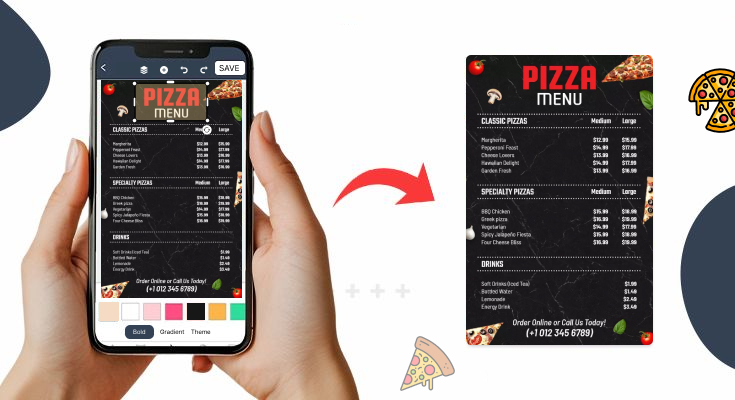
Creating a pizza menu might seem straightforward, but developing one that truly drives sales requires careful planning and strategic thinking. Furthermore, your menu serves as a silent salesperson that can significantly impact your restaurant’s profitability.
In this comprehensive guide, you’ll discover exactly how to make a pizza menu that attracts customers, increases average order value, and builds a loyal customer base. So let’s find out.
Why Does Your Pizza Menu Design Matter So Much?
Great pizza menu designs directly influence customer behavior and sales performance. Moreover, studies show that well-designed menus can increase sales by up to 20%. When customers can easily navigate your offerings, they’re more likely to order additional items and return for future visits.
Additionally, your menu reflects your brand identity and sets customer expectations. A professional, well-organized menu builds trust and credibility with potential customers.
Therefore, investing time in creating an effective pizzeria menu pays dividends in both immediate sales and long-term customer relationships.
How to Create Your Pizzeria Menu for Maximum Sales?
A well-designed pizzeria menu can encourage people to buy more and come back again. Here’s the process of how to make a pizza menu that maximizes sales.
1. Start with a Clear Structure
A clear structure is the foundation of a great menu. You should organize your menu into sections that are easy to scan and understand. Most pizza start with these basic categories:
- Classic Pizzas
- Signature or Special Pizzas
- Build-Your-Own Pizza
- Sides and Appetizers
- Drinks
- Desserts
- Combos or Meal Deals
Putting similar items together helps customers quickly find what they’re looking for. If the menu is too crowded or messy, people may feel confused or overwhelmed, which can lead to lower sales.
2. Consider Strategic Menu Layout
The layout of your pizza menu significantly impacts what customers order. Therefore, place high-profit items in prime locations where eyes naturally focus first. Research shows that customers typically scan menus in a Z-pattern, starting at the top-left corner.
Furthermore, use the “golden triangle” principle by positioning your most profitable items in the upper-right corner, center, and upper-left areas. This strategic placement naturally draws attention to items with better profit margins. Here are the best menu layout templates and examples that will help you organize each section very well, which look more professional and engaging.
3. Effective Use of White Space
Don’t overcrowd your menu with too much information. Instead, use white space strategically to make your menu easier to read and more visually appealing. Additionally, adequate spacing between sections helps customers process information more effectively.
How Much White Space: Aim for about 30-40% of your menu to be white space. This means if you have a full-page menu, roughly one-third should be empty space around text and between sections.
Strategic White Space Placement:
- Around high-profit items – Creates a “spotlight effect”
- Between categories – Helps customers navigate sections
- Around promotional boxes – Makes special offers pop out
4. Use Tempting Pizza Descriptions
Words sell. That’s why you should write mouthwatering menu descriptions for every pizza you serve. Instead of just listing ingredients, describe the flavor and feeling.
Bad Example: Pepperoni Pizza – cheese, sauce, pepperoni.
Good Example: Pepperoni Blaze – Loaded with crispy pepperoni slices, creamy mozzarella, and our signature tangy tomato sauce on a hand-tossed crust.
Use tasty words like “crispy,” “melty,” “spicy,” “fresh,” or “wood-fired” to make customers hungry. Descriptions help customers imagine the taste, which increases the chance of a purchase.
5. Menu Categories and Flow
The order of your menu sections should mirror how customers naturally think about their dining experience.
The Psychological Flow:
- Appetizers First – Start with smaller, lighter items that don’t seem overwhelming. This gets customers in a “yes” mindset before presenting bigger decisions.
- Salads and Soups – These items serve health-conscious customers and those wanting lighter options. Placing them early shows you cater to different needs.
- Main Pizzas – Your bread and butter should be prominently displayed in the center sections where customers spend the most time.
- Specialty Items – After customers have seen your main offerings, they’re ready to consider unique or premium options.
- Desserts and Beverages – End with items that complete the meal and increase total order value.
6. Use Strategic Pricing
Pricing isn’t just about profit—it’s about psychology. People often compare prices before choosing. Use these tips:
- Offer small, medium, and large sizes
- Bundle pizzas into meal deals
- Keep prices in round numbers ($20 instead of $19.49)
- Place premium items near high-margin products for contrast
Use pricing to gently guide customers toward mid-range or combo options that increase your revenue without making them feel like they’re spending too much.
7. Promote Combos and Meal Deals
Combos and meal deals are powerful tools for increasing your average order value while offering customers more convenience and savings. Instead of selling a single pizza, you can bundle it with sides, drinks, or desserts at a slightly discounted price, making the offer more attractive.
For example, a combo like “1 Large Pizza + Garlic Bread + 2 Drinks for $40” feels like a better deal than ordering each item separately. These bundled offers encourage people to spend more without feeling like they’re overpaying. Combos also simplify decision-making—especially for groups or families—by offering ready-made options instead of multiple individual choices.
You can create various combos based on time (like lunch specials), group size (family packs), or even themes (weekend feast, party pack). Place these deals prominently at the top or center of your menu, use eye-catching visuals, and label them with words like “Best Value” or “Customer Favorite” to grab attention.
8. Add Eye-Catching Visuals
Including eye-catching visuals in your pizza menu can significantly boost customer engagement and sales. High-quality food images trigger appetite and emotions, making people more likely to order items they see. A picture of a cheesy, golden-brown pizza slice being pulled apart is far more persuasive than words alone. Visuals help customers imagine the taste and texture, especially for signature or premium pizzas.
Use bright, well-lit images that highlight the freshness, color, and toppings of your food. However, it’s important not to overcrowd the menu with too many pictures, which can make it look cluttered or cheap. Instead, strategically place images next to your best-selling or high-margin items to guide customer attention.
A visually appealing menu not only looks professional but also helps customers make faster, more confident choices, leading to increased sales and a better dining experience.
9. Make it Easy for Takeout and Delivery
In today’s fast-paced world, many customers prefer ordering food for takeout or delivery, so your pizza menu should make this process as smooth and convenient as possible.
First, include all essential contact information clearly on the menu—such as your phone number, website, and address. If you partner with third-party delivery platforms, add their logos or a line mentioning their brand name to build trust and familiarity.
Therefore, creating QR code menus is also a great option; when scanned, they should lead directly to your online ordering page or menu, saving time and effort for the customer.
What are the Essential Elements Every Pizza Menu Needs?
1. Core Pizza Categories
Start by organizing your pizzas into clear categories that make sense to customers. Most successful pizza include these essential sections:
- Signature Pizzas – Your unique creations that set you apart from competitors
- Classic Pizzas – Traditional favorites like Margherita, Pepperoni, and Supreme
- Specialty Pizzas – Gourmet options with premium ingredients
- Build Your Own – Customizable options with a clear pricing structure
2. Descriptive and Tempting Item Names
Use names that excite taste buds. Add a short, appetizing description for each pizza.
Example: Spicy Inferno – Hot chili sauce, jalapeños, pepperoni, and red onions on a thin crust.
Descriptions should include:
- Main ingredients
- Flavor profile (spicy, smoky, creamy)
- Unique selling points (wood-fired, hand-tossed, gluten-free)
3. Customizable Options
Today’s diners love personalization. Offer choices such as:
- Crusts: Thin, pan, gluten-free, stuffed
- Sauces: Tomato, white garlic, pesto
- Toppings: Vegetables, meats, cheeses, vegan alternatives
Highlight popular add-ons to boost average order value.
4. Complementary Food Items
Beyond pizzas, your menu should include items that increase average order value:
- Appetizers – Wings, garlic bread, salads, and shareable starters
- Sides – French fries, onion rings, and vegetable options
- Desserts – Sweet endings that encourage larger orders
- Beverages – Soft drinks, beer, wine, and specialty drinks
5. Pricing That’s Easy to Understand
Use a clean, consistent format:
- Regular – $15
- Medium – $25
- Large – $35
For build-your-own pizzas, clearly list the base price and add-on costs.
6. Visually Appealing Design
Use high-quality images, consistent fonts, and a readable layout. Stick to your brand’s color scheme and tone. Include your logo and social handles if applicable.
7. Contact and Ordering Info (For Takeout or Delivery)
If offering delivery or takeaway:
- Mention the delivery radius or platforms
- Include a QR code, phone number, or ordering link
What are Common Pizza Menu Mistakes to Avoid?
1. Too Many Items on the Menu
When your menu has too many pizza varieties, sides, and drinks, it can confuse customers. People may take longer to decide or feel overwhelmed. It also increases your kitchen’s workload and ingredient costs. A smaller, focused menu helps customers choose faster and lets you maintain quality.
Tip: Offer your top 6–10 pizza choices and only a few sides and desserts.
2. Poor Menu Layout and Design
A cluttered or hard-to-read menu turns customers off. If the font is too small, colors don’t contrast well, or there are no sections, it becomes frustrating.
Tip: Use a clean layout with readable fonts, clear categories (like Pizza, Sides, Drinks), and high-contrast colors.
As a designer or restaurant owner, if you don’t know what typography and colors work best for menu design, you must check out this guide.
3. Not Highlighting Best-Sellers or Profitable Items
If your most popular or profitable pizzas aren’t highlighted, customers may skip them. Missing out on these orders can affect both customer satisfaction and your profits.
Tip: Use symbols like a star ★ or a “Chef’s Favorite” label next to your top items.
4. No Photos or Low-Quality Images
Menus without photos miss a chance to tempt customers. But using low-quality or unappetizing images can do more harm than good.
Tip: Use a few high-quality, mouth-watering images—especially for signature pizzas or new specials.
5. Using Complicated or Fancy Names
Unclear names or descriptions can confuse customers, especially first-timers. If someone doesn’t understand what’s on the pizza, they may skip it.
Tip: Use simple names and include a clear list of toppings below each pizza.
6. Not Offering Customization
Pizza is all about choice. If customers can’t pick their crust, sauce, or toppings, they may feel limited.
Tip: Include a “Build Your Own Pizza” section or mention available add-ons and crust options.
7. Ignoring Dietary Needs
Many customers today have specific dietary preferences or restrictions, like being vegetarian, vegan, gluten-free, or lactose-intolerant. If your pizza menu doesn’t offer options to meet these needs or clearly label them, you risk losing potential customers. People with food allergies or dietary concerns want to feel confident when ordering. Without clear labels or choices, they may skip your pizza altogether.
Adding a few inclusive options—such as gluten-free crust, dairy-free cheese, or a fully vegan pizza—and using simple icons like 🌱 for vegetarian or 🌾 for gluten-free can make a big difference. It shows customers that you care about their health and food choices, and it can help you attract a wider audience.
8. No Deals or Combo Offers
Not offering deals or combo meals on your pizza menu is a missed opportunity to boost sales and customer satisfaction. Combos help customers feel they’re getting more value for their money, which can encourage them to spend more than they originally planned. For example, a customer might order just one pizza, but if you offer a combo like “Large Pizza + Garlic Bread + 2 Soft Drinks” at a discounted price, they’re more likely to go for the bundle.
This increases your average order value and helps sell-side items that might otherwise be overlooked.
Good news for you, to make the process efficient, smoother, there are plenty of customizable menu templates and designs, not just for pizza , but the entire food industry that you can easily customize, and create a menu that sells.
What are the Menu Pricing Strategies that Work for Pizza Restaurants?
Psychological Pricing Techniques:
Implement pricing strategies that encourage higher spending without deterring customers. For instance, avoid using dollar signs, which can make prices seem more expensive. Instead, simply list prices as numbers (15.99 rather than $15.99).
Moreover, use charm pricing (ending prices in .99 or .95) for value items, while using round numbers for premium pizzas to convey quality and sophistication.
Value Bundling Options:
Create attractive combo deals that increase average order value:
- Pizza and Drink Combos – Popular for lunch specials
- Family Meal Deals – Large pizza with sides and drinks
- Date Night Packages – Two personal pizzas with an appetizer and dessert
- Group Party Platters – Multiple pizzas with sides for events
Competitive Pricing Analysis:
Research your local competitors’ pricing to ensure your pizza menu remains competitive. However, don’t simply match their prices. Instead, focus on providing superior value through better ingredients, larger portions, or unique offerings that justify your pricing structure.
Frequently Asked Questions
1. How should I organize the sections of my pizza menu?
Organize your menu into clear, logical sections—such as Specialty Pizzas, Build Your Own, Sides, Drinks, and Desserts. Start with your best-selling or most profitable items at the top of each section. This helps customers navigate the menu easily and make quicker decisions.
2. What kind of design layout works best for a pizza menu?
Use a clean, uncluttered layout with plenty of spacing between items. Stick to one or two fonts, and use bold headers for sections. Group similar items together and avoid crowding the page. A balanced design improves readability and overall customer experience.
3. Where can I find customizable pizza menu templates?
You can find customizable pizza menu templates on design platforms like Lisi.menu. It is an easy-to-use menu maker where you can change colors, fonts, images, and text without needing professional design skills. Just pick a design that matches your brand and style, customize it, and you’re ready to print or share it online.
4. How do I highlight best-selling or signature pizzas?
You can use icons, borders, or labels like “Chef’s Favorite” or “Most Popular” to draw attention to key items. Bold text, different colors, or a small star symbol (★) also help highlight your best options. This guides customers toward choices you want to promote.
5. Should I offer combo meals or deals on my menu?
Absolutely. Combo deals like “1 Large Pizza + Garlic Bread + 2 Drinks” encourage customers to spend more and feel they’re getting better value. Clearly list combo options on the menu and place them where they’ll be noticed easily, like at the top or in a special box.
6. Should I use a digital or printed menu for my pizza?
It depends on your setup. Printed menu is great for dine-in and takeaway, while designing a digital menu (QR codes or screens) is ideal for modern, contactless service. Many pizza places now offer both for flexibility and convenience.
7. What colors and branding should I use in my pizza menu design?
Use colors that match your brand identity. Red, orange, and yellow are popular for pizza because they stimulate the appetite. Make sure the color palette is consistent with your logo, website, and interior design for a unified look.
Bottom Words
This was all about how to make a pizza menu that makes it easy and exciting for your customers to order their desired pizza smoothly.
Try to implement all the core principles outlined in this guide: clear organization, strategic pricing, compelling descriptions, and appealing visual design. Additionally, don’t try to perfect everything at once. Instead, make gradual improvements and measure their impact on sales and customer satisfaction.
Moreover, dedicated time and resources are necessary to create a menu that truly represents your pizzeria’s potential.