
A casual chicken burger menu template is essential for creating a visually appealing and well-organized dining experience.
A thoughtfully designed menu enhances readability, guides customer choices, and strengthens brand identity, ensuring a smooth and engaging ordering process for diners.
Moreover, with the use of a free menu maker, customizing this template, and showcasing the foods you serve becomes easier and efficient.
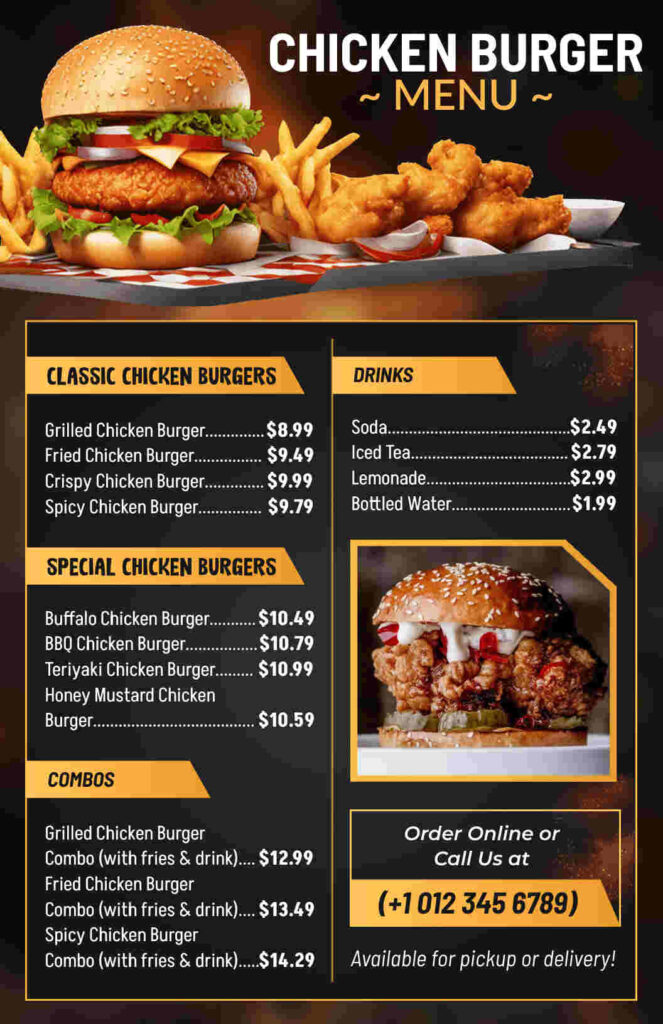
The casual chicken burger menu template presents a strong black and gold color combination, which provides both comfort and refined quality.
The top position of the crispy chicken burger image creates an immediate urge for food and makes navigation easier through the logical section divisions.
The contemporary typeface, alongside clear elements of contrast, allows customers to easily view prices and item names alongside their order process.
The template allows customers to access high-profit items while navigating the chicken burger choices.
Also, other menu designs have content in a directed way to provide a smooth ordering process, and the included call-to-action elements guide users toward online orders.
The targeted combination of inventive aesthetic elements with practical options creates an ultimate experience for customers who bring better profit results to restaurants.
What is the Role of Visual Hierarchy in a Chicken Burger Menu Template?
A well-designed chicken burger menu template leverages visual hierarchy to guide customers’ attention and enhance their ordering experience.
Visual hierarchy refers to the strategic arrangement of menu elements—such as headings, images, colors, and fonts—to emphasize key sections and influence purchasing decisions.
1. Headings and Subcategories for Clarity
The use of bold and prominent headings, such as “Classic Chicken Burgers” and “Special Chicken Burgers,” immediately tells customers where to look. Subcategories further refine choices, making it easier to navigate the menu.
A clear distinction between burger types, combos, and drinks ensures a structured flow.
2. Strategic Use of Colors and Fonts
Colors play a crucial role in visual hierarchy. For example, warm tones like orange and yellow can stimulate appetite, while contrasting text colors ensure readability.
A chicken burger menu template with high-contrast fonts—such as bold white text on a dark background—enhances visibility and draws attention to essential details like prices and special offers.
3. Image Placement for Maximum Impact
Placing high-quality images near premium items, such as specialty burgers or combo meals, encourages impulse purchases.
A strategically placed image of a crispy chicken burger can entice customers to order. Menus that use images effectively create a stronger connection with the food and increase sales.
4. Highlighting Prices and Deals
Price formatting affects decision-making. Menus that subtly de-emphasize pricing by using smaller fonts or removing currency symbols prevent cost-conscious hesitations.
Conversely, highlighting deals, such as “Combo Meals,” with larger or colored text makes them stand out and encourages value-driven purchases.
5. Logical Flow for a Seamless Ordering Experience
An effective chicken burger menu template follows a natural reading flow, typically from top to bottom or left to right. High-demand or signature items are positioned where the eye naturally lands first.
Logical grouping—starting with burgers, followed by combos, and ending with drinks—ensures a seamless and satisfying ordering process.
What are the Key Features of the Chicken Burger Menu Template?
This Chicken Burger Menu Template is designed to enhance both aesthetics and functionality. Key features include:
- Color-Blocking Layout: Uses vibrant color sections to separate categories and improve readability.
- Clear Typography: Bold, modern fonts for headings and easy-to-read sans-serif fonts for descriptions.
- Organized Food Categories: Sections for combos, sandwiches, wings, and tenders ensure a logical flow.
- Strategic Pricing Placement: Prices are aligned neatly for effortless comparison.
- High-Quality Imagery: Space for mouthwatering burger images to attract customers.
- Minimalist yet Engaging Design: Avoids clutter while maintaining an inviting look.
These features work together to create a professional and visually appealing menu that enhances the customer experience.
How to Craft the Perfect Chicken Burger Menu Template Structure?
The proper organization of menus creates both consumer interest and simple product selection procedures. These steps will help you organize your menu successfully:
1. Hero Section
- Showcase your signature chicken burger with a stunning image and bold pricing. The first position of an irresistible top-tier image for your bestseller engages customers instantly in their first impressions. The description explains the distinctive features of this exceptional burger.
2. Category Segmentation
- Your menu must be arranged into traditional burgers, exclusive options, and meal bundles to assist customers with their selection. The proper sectioning of menu items controls information density and lets users browse through the content smoothly. Your menu should organize items into the categories of “Spicy Burgers,” “Grilled Options,” and “Vegetarian Choices.”
3. Highlighting Bestsellers
- Popular burgers should be distinguishable through symbols, borders, or background colors. A strong sense of popularity appears to boost customer selection of certain items on the menu. Customers should be drawn towards the restaurant’s recommended dishes by featuring a “Chef’s Pick” label.
4. Beverage & Side Pairing
- Subjects should place speedy food side items with burger options for increased customers to buy add-ons. Placing a combo section at the right spot in a menu format will urge customers to increase their spending without being obvious. The combination of a burger with fries and a drink qualifies for a promotional discount.
5. Customization & Add-ons
- The restaurant should present upgraded choices, including additional cheese and spicy condiments, and doubling patties to increase customer contentment. The merits of customization enhance user connection and deliver control over eating choices to customers. Present all add-on choices on the menu so customers can easily access them.
How a Professional Chicken Burger Menu Template Boosts Your Restaurant’s Appeal?
Using a professionally designed menu template enhances branding and customer satisfaction. This Chicken Burger Menu Template helps restaurants by:
- Maintaining brand consistency: A well-structured layout ensures a cohesive look that aligns with your restaurant’s identity.
- Enhancing readability: The clear font hierarchy and sectioned layout improve the overall dining experience.
- Increasing sales potential: A well-presented menu guides customers toward popular or high-margin items, boosting revenue.
With a polished and organized design, this menu template ensures that your restaurant delivers both aesthetic appeal and functional efficiency.
Conclusion
The chicken burger menu template should deliver both food listing and sales engagement and food discovery. Strategic visual layouts with carefully selected pricing techniques combined with remarkable design enhancements will produce a menu that generates revenue and gives customers an outstanding dining experience.
When your menu strikes the right balance between visual appeal, ease of reading, and brand identification, you can create a promotional tool that makes substantial contributions to restaurant success.